> For the complete documentation index, see [llms.txt](https://docs.cian.app/llms.txt). Markdown versions of documentation pages are available by appending `.md` to page URLs; this page is available as [Markdown](https://docs.cian.app/yieldlayer/for-users-quick-start/automated-strategies/faqs.md).
# FAQs
#### 1. The withdrawal status remains 'Pending,' or the strategy page does not display the amount
**There are 3 main reasons for this issue:RPC issueVPN is unavailableWallet confirmation delay for signature requestHere are the corresponding solutions for each:RPC issue:**
* Visit to find the fastest RPC URL
* Add the URL to your Wallet and try again
**For VPN issues:**
* If you are using a VPN, try switching to a different region or disabling the VPN
* Please try deposit/withdraw/refresh the page again with the VPN disabled
**Unconfirmed signature request:**
* Clear your browser cookies
* Refresh the page
* Reconnect your wallet
* Sign the signature request in your wallet
Please try these steps accordingly. If still doesn't work, open a ticket in 「✋」-support channel in [CIAN Discord](https://discord.gg/cian) and provide your EOA wallet address (eg. Metamask) and smart wallet address
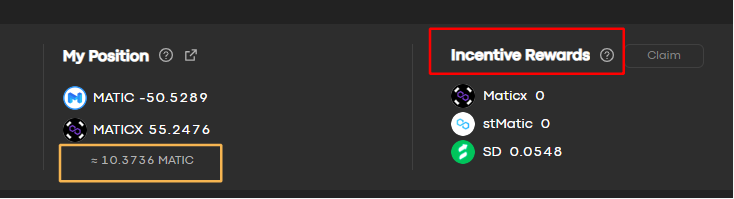
#### 2. Why is there no profit from the MATIC/MATIX (6x) Automated Strategy? Why do the 'Incentive rewards' display as '0'?
You can check 'My position', the amount of MATIC will increase slowly **(this is your earnings)** .
**Incentive rewards** represent the earnings from incentives. AAVE has suspended the distribution of incentives, so 'Incentive Rewards' will show as ‘’0‘’\
\
Typically, the MATIC strategy has a break-even time of **15** days, after which you can start enjoying the profits\
\
**The strategy apy**= principal staking apy + leverage staking apy +supply apy- borrow apy + incentive apy. Incentive rewards represent the earnings of incentive apy. If the 'incentive apy' shows '0' in the apy composition, then it's normal you don't have any incentive rewards.